

Download Pin – Free Pinterest Desktop App for Mac
Overview
Pin is a lightweight, free desktop client that brings the visual discovery power of Pinterest directly to macOS. Developed by Chatsworth and Whitton Limited, the application belongs to the Social & Communication category with a focus on chat‑style interaction for pinning, browsing, and organizing ideas without opening a web browser. The current version (1.9) was refreshed on 1 April 2017 and remains compatible with macOS X and earlier releases, making it a reliable option for users who prefer a native app over the online platform.
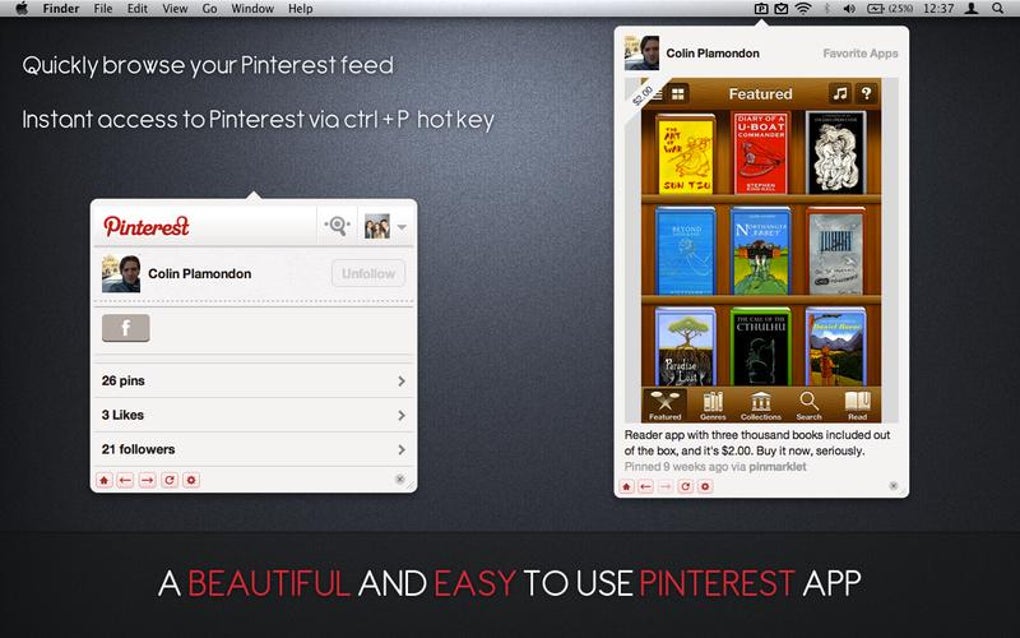
Pin’s primary appeal lies in its simplicity: a clean, Mac‑styled interface that mirrors the Pinterest experience while offering drag‑and‑drop pinning, instant board creation, and offline thumbnail caching for faster browsing. Because it is built specifically for macOS, the program adheres to Apple’s design guidelines, delivering smooth animations, Retina‑ready graphics, and seamless integration with the system menu bar. English is the only supported language, but the intuitive iconography makes it accessible to non‑native speakers as well.
Since its addition to the software catalog in 2016, Pin has attracted a modest but dedicated user base, especially in the United Kingdom, where it is most frequently downloaded. Whether you’re a designer hunting inspiration, a marketer curating visual assets, or simply a hobbyist who loves pinning recipes and travel ideas, Pin provides a secure, free alternative that keeps your favorite pins just a click away from your desktop.
Key Features
- Native macOS experience – Fully optimized for macOS X with Retina support and menu‑bar integration.
- Instant board management – Create, rename, and rearrange boards without leaving the app.
- Drag‑and‑drop pinning – Pin images from any website or local folder directly onto your boards.
- Offline thumbnail cache – Frequently viewed pins are cached locally for faster loading and limited internet use.
- Search and filter tools – Advanced search options let you filter pins by board, keyword, or date.
- Secure login – OAuth‑based authentication ensures your Pinterest credentials are never stored locally.
- Automatic updates – The app checks for new releases and prompts you to download updates securely.
- Minimal system footprint – Designed to consume low RAM and CPU, keeping your Mac fast and responsive.
- Menu‑bar quick access – Shortcut to recent boards and a “Pin it” button right from the menu bar.
- Free for personal use – No hidden fees, no trial period, and no ads that interrupt your creative flow.
Installation, Usage & Compatibility
Step‑by‑step installation
Installing Pin on your Mac is straightforward. First, visit the official download page or the trusted software catalog where Pin is listed. Click the “Download” button, which delivers a .dmg installer file.
Open the file and drag the Pin icon into your Applications folder, following the standard macOS installation wizard. The installer will verify the code signature to ensure the app is authentic and free from malware. After copying, you can eject the virtual disk image.
When you launch Pin for the first time, macOS may present a security prompt asking whether you trust the developer; simply click “Open” to proceed.
Getting started
Upon launch, Pin presents a clean login screen that redirects you to Pinterest’s OAuth page in a secure Safari window. After you authorize the app, you are returned to the Pin interface, where your boards appear on the left sidebar. To pin an image, drag it from any website or Finder window onto the board of your choice; Pin will automatically generate a thumbnail and store the source URL.
You can also use the “+” button on the menu bar to create new boards or add pins without opening the main window. The search bar at the top allows you to type keywords and instantly filter results across all boards. Settings are accessible via the gear icon, where you can toggle offline caching, choose whether to start Pin at login, and adjust notification preferences.
System requirements
Pin runs on macOS X 10.9 (Mavericks) and newer, including macOS Catalina, Big Sur, and Monterey. The application is built for 64‑bit Intel processors, and a universal binary is available for Apple Silicon (M1/M2) through Rosetta 2 translation, ensuring smooth performance on the latest Macs. Minimum RAM requirement is 2 GB, though 4 GB or more is recommended for heavy pinning sessions. Disk space usage is modest, typically under 150 MB, but the offline cache may grow depending on how many pins you store.
Updates and support
Pin checks for updates automatically each time it launches. When a new version is detected, a discreet notification appears, allowing you to download and install the update with a single click. Because the software is free, support is community‑driven through a dedicated forum hosted by Chatsworth and Whitton Limited. Users can report bugs, request features, or share workflow tips. The developers also maintain a changelog that details bug fixes, performance improvements, and new features introduced in each release.
Pros, Cons & Frequently Asked Questions
Pros
- Completely free with no hidden advertisements.
- Native macOS design offers smooth performance and Retina clarity.
- Drag‑and‑drop pinning simplifies the workflow compared to a browser.
- Offline thumbnail cache speeds up browsing and reduces data usage.
- Secure OAuth login keeps your Pinterest credentials safe.
Cons
- Limited to English language only.
- No native Windows or mobile version, restricting cross‑platform use.
- Feature set is basic; power users may miss advanced analytics or bulk import tools.
- Last major update was in 2017, raising concerns about long‑term maintenance.
- No official support channel beyond community forums.
Frequently Asked Questions
Is Pin safe to use with my Pinterest account?
Yes. Pin uses OAuth authentication, which means your username and password are never stored or transmitted by the app. You log in through Pinterest’s official login page, and the app receives a secure token that grants limited access.
Can I sync pins made in Pin back to my mobile device?
All pins created in Pin are saved to your Pinterest account in the cloud. Therefore, any board or pin you add on your Mac will instantly appear on the Pinterest mobile apps and the web version.
Does Pin work on Apple Silicon (M1/M2) Macs?
Yes. While Pin is compiled for Intel, it runs flawlessly on Apple Silicon Macs via Rosetta 2. Users have reported no performance degradation.
Is there a way to export my boards from Pin?
Pin does not include a built‑in export function. However, because pins are stored in your Pinterest account, you can use Pinterest’s native export tools or third‑party services to back up your boards.
How much disk space does Pin actually use?
The base application occupies roughly 120 MB. The offline cache size varies based on usage but can be cleared in the preferences if you need to free up space.
Pin delivers a solid, no‑cost solution for macOS users who want a dedicated Pinterest client. Its native design and drag‑and‑drop workflow speed up visual curation, while the lack of ads and secure login keep the experience pleasant. The main drawbacks are its limited language support and the fact that development has slowed, which may affect future compatibility. Overall, Pin earns a respectable four‑star rating for its core functionality and ease of use.
Conclusion & Call to Action
If you spend a lot of time on Pinterest and prefer not to toggle between a browser tab and your desktop, Pin is the perfect companion for your Mac. Its free price tag, native macOS integration, and straightforward pinning workflow make it an attractive option for designers, marketers, and everyday users alike. While the app could benefit from a more frequent update schedule and expanded language options, its current feature set covers the essential needs of most Pinterest enthusiasts. Ready to streamline your visual discovery process? Download Pin now and start organizing your inspiration with a native Mac experience that’s secure, fast, and completely free.







